Android/Project
WeFace - 서버에 이미지 업로드
dyui
2022. 6. 20. 13:00
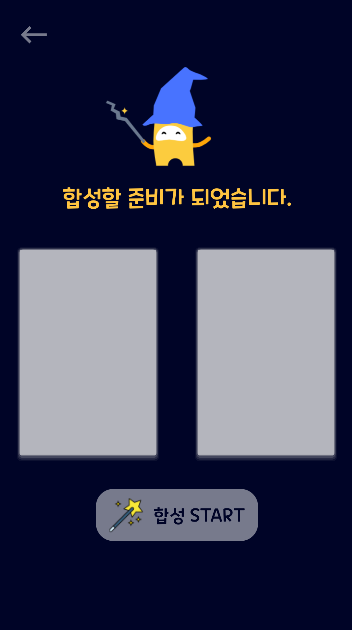
선택한 이미지 두장이 ImageView에 띄워지고 합성버튼을 누르면 Django의 Restful API로 구축된 서버에 이미지 두장이 업로드 되도록 구현해보았다.
나는 okhttp3 Multipart를 사용하였고 file을 서버로 업로드 하는데 성공하였다.
[EyeImageActivity3.java]
public class EyeImageActivity3 extends AppCompatActivity {

    ImageView iv_image1, iv_image2;
    Button btn_start, btn_back;

    @Override
    protected void onCreate(Bundle savedInstanceState) {
        super.onCreate(savedInstanceState);
        setContentView(R.layout.activity_eye_image3);

        iv_image1 = (ImageView) findViewById(R.id.iv_image);
        iv_image2 = (ImageView) findViewById(R.id.iv_image2);
        btn_start = (Button) findViewById(R.id.btn_start);
        btn_back = (Button) findViewById(R.id.btn_back);

        iv_image1.setImageBitmap(((EyeCameraActivity1) EyeCameraActivity1.context_camera1).rotatedBitmap1);
        iv_image2.setImageBitmap(((EyeCameraActivity2) EyeCameraActivity2.context_camera2).rotatedBitmap2);

        //합성하기 버튼을 누를시
        btn_start.setOnClickListener(new View.OnClickListener() {
            @Override
            public void onClick(View view) {

                UploadUtils.send_eye(((EyeCameraActivity1) EyeCameraActivity1.context_camera1).file_1);
                UploadUtils.send_eye(((EyeCameraActivity2) EyeCameraActivity2.context_camera2).file_2);
                Intent intent = new Intent(EyeImageActivity3.this, Loading_Eye.class);
                startActivity(intent);
            }
        });
    }
}
[UploadUtils.java]
public class UploadUtils {    //서버에 보낼 데이터

    //눈 사진 합성시켜주는 API로 전송
    public static void send_eye(File file){
        RequestBody requestBody = new MultipartBody.Builder()
                .setType(MultipartBody.FORM)
                .addFormDataPart("image", file.getName(), RequestBody.create(MultipartBody.FORM, file))
                .build();
        Request request = new Request.Builder()
                .url("url주소")
                .post(requestBody)
                .build();

        OkHttpClient client = new OkHttpClient();
        client.newCall(request).enqueue(new Callback() {
            @Override
            public void onFailure(Call call, IOException e) {
                e.printStackTrace();
            }
            @Override
            public void onResponse(Call call, Response response) throws IOException {
                Log.d("TEST : ", response.body().string());
            }
        });
    }
[activity_eye_image3.xml]
<?xml version="1.0" encoding="utf-8"?>
<LinearLayout xmlns:android="http://schemas.android.com/apk/res/android"
    xmlns:app="http://schemas.android.com/apk/res-auto"
    xmlns:tools="http://schemas.android.com/tools"
    android:layout_width="match_parent"
    android:layout_height="match_parent"
    tools:context=".EyeImageActivity3"
    android:background="#000427"
    android:orientation="vertical">

    <Button
        android:id="@+id/btn_back"
        android:layout_width="40dp"
        android:layout_height="40dp"
        android:layout_marginLeft="20dp"
        android:layout_marginTop="20dp"
        android:background="@drawable/back"
        android:backgroundTint="#777A8C"
        tools:ignore="TouchTargetSizeCheck,SpeakableTextPresentCheck" />

    <ImageView
        android:id="@+id/wizard"
        android:layout_width="match_parent"
        android:layout_height="150dp"
        android:layout_gravity="center"
        android:src="@drawable/wizard_image2" />

    <LinearLayout
        android:layout_width="match_parent"
        android:layout_height="wrap_content"
        android:orientation="vertical">

        <TextView
            android:id="@+id/textview2"
            android:layout_width="match_parent"
            android:layout_height="wrap_content"
            android:text="합성할 준비가 되었습니다."
            android:textSize="25dp"
            android:textColor="#FFC440"
            android:layout_marginBottom="20dp"
            android:gravity="center"/>

    </LinearLayout>


    <LinearLayout
        android:layout_width="match_parent"
        android:layout_height="300dp"
        android:orientation="horizontal">

        <ImageView
            android:id="@+id/iv_image"
            android:layout_width="match_parent"
            android:layout_height="250dp"
            android:layout_weight="1"
            android:layout_margin="20dp"
            android:background="@drawable/et_shadow"
            />

        <ImageView
            android:id="@+id/iv_image2"
            android:layout_width="match_parent"
            android:layout_height="250dp"
            android:layout_weight="1"
            android:layout_margin="20dp"
            android:background="@drawable/et_shadow"
            />

    </LinearLayout>

    <LinearLayout
        android:layout_width="match_parent"
        android:layout_height="wrap_content"
        android:orientation="horizontal"
        android:gravity="center">

    <Button
        android:id="@+id/btn_start"
        android:layout_width="wrap_content"
        android:layout_height="60dp"
        android:padding="15dp"
        android:text="  합성 START"
        android:textSize="20dp"
        android:textColor="#000427"
        android:background="@drawable/button_bg"
        android:drawableStart="@drawable/magic"/>

    </LinearLayout>

</LinearLayout>